Posts

Custom Perl Script for Email Notification when Host is Down.

I have found the Perl script for ping in Cacti. I have modified that script to restart quagga service, save the date-time in a file and send email notification whenever a host is down. Here it is: [root@busy-bee2 ~]cat ping.pl #!/usr/bin/perl # take care for tcp:hostname or TCP:ip@ $host = $ARGV[0]; $host =~ s/tcp:/$1/gis; open(PROCESS, "ping -c 1 $host | grep icmp_seq | grep time |"); $ping = <PROCESS>; close(PROCESS); $ping =~ m/(.*time=)(.*) (ms|usec)/; if ($2 == "") { print "U"; # avoid cacti errors, but do not fake rrdtool stats $comand = "/etc/init.d/ospfd restart; date >> /root/quagga_restarted; echo quaggaRestarted | mail -s quaggaRestartedFly user\@domain.tld"; system("$comand"); } elsif ($3 eq "usec") { print $2/1000; # re-calculate in units of "ms" }else{ print $2; }   One can use a...
Quagga OSPF Simulation in CentOS 6

Image
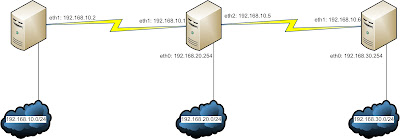
Scenario This article is actually a modified version of a previous article IP Details All the Routers in the diagram are actually CentOS Machines. Router Alpha: eth0: 192.168.10.254/24 eth1: 10.0.0.2/30 Router Beta: eth0: 192.168.20.254/24 eth1: 10.0.0.1/30 eth2: 10.0.0.5/30 Router Gamma: eth0: 192.168.30.254/24 eth1: 10.0.0.6/30 Objective We would be configuring the Linux boxes with dynamic routing protocol OSPF for total connectivity. This would be done with the help of Quagga. Router Alpha Configuration root@alpha:~# yum install quagga W e would be configuring the interface parameters. Keep in mind, there are example configuration files stored in /usr/share/doc/quagga/ root@alpha:~# cd /etc/quagga root@alpha:/etc/quagga# cat zebra.conf .sample > zebra.conf root@alpha:/etc/quagga# vim zebra.conf  hostname AplhaRouter password zebra enable password zebra ! ! Interface's description....

Samba Domain Controller Cluster Using Heartbeat and CentOS 6

In this segment, we would be creating a Samba Server Cluster using Heartbeat and CentOS 6. First, we start by understanding, what is a server cluster? A server cluster is a collection of servers that provide similar network services. They share an IP address/FQDN and the client hosts communicate with that IP/FQDN to obtain network services. The part to notice here is that multiple servers are used for auto redundancy and in cases, load balancing. Which simply means, even if one of the servers are down, the other servers would take over and the client will get the services from the backup servers. The whole process is automatic and with proper configuration, seamless. The client wouldn't even know that it's using a backup server. For example, let us assume that server 1 and server 2 have IP address of IP1 and IP2 respectively. Both of them are configured as web servers. We have an IP address IP3 that can be resolved to www.testdomain.com. So, to create an auto redundant clus...

Migrating Samba Server and Users in CentOS 6

To migrate Samba users from one server to another, we will be needing to migrate the following - /etc/passwd /etc/group /etc/shadow home directories and shared directories /etc/samba /var/lib/samba We assume that we have two servers: old-server (192.168.10.10)  and new-server (192.168.10.20) . Some of the commands are need to be run in the old-server and some need to be run in new-server. Old Server: Backing up users, groups and passwords [root@old-server ~]# mkdir /root/move [root@old-server ~]# export UGIDLIMIT=500 [root@old-server ~]# awk -v LIMIT=$UGIDLIMIT -F: '($3>=LIMIT) && ($3!=65534)' /etc/passwd > /root/move/passwd.mig [root@old-server ~]# awk -v LIMIT=$UGIDLIMIT -F: '($3>=LIMIT) && ($3!=65534)' /etc/group > /root/move/group.mig [root@old-server ~]# awk -v LIMIT=$UGIDLIMIT -F: '($3>=LIMIT) && ($3!=65534) {print $1}' /etc/passwd | tee - |egrep -f - /etc/shadow > /root/move/shadow.mig   NO...

Samba as Primary Domain Controller in CentOS 6

Image
Step 1: Installing Samba All the necessary RPM should be present in the installation media (CD/DVD). If needed, the online repository of repoforge.org is very good too. [root@firefly ~]# yum install samba   Step 2: Preparing the Configuration Files Now that Samba is installed, it is time to prepare the configuration file. I've said it before and I'll say it again, it's always a good idea to back up the .conf file before modifying. [root@firefly ~]# cd /etc/samba/ [root@firefly samba]# cp smb.conf smb.conf.bak [root@firefly samba]# vim smb.conf   Here are the modifications workgroup = SCRUB ## The actual name of the domain ## hosts allow = 127. 192.168.1. ## The IP range to be allowed. Alternatively, the “interfaces” parameter may be used. ## security = user passdb backend = tdbsam domain master = yes domain logons = yes logon path = ## Because netlogons create more problems than benefit, we have used an empty logon path to force user accounts t...

SARG on CentOS 6

Image
A newer version of this article is available in my blog:  http://amar-linux.blogspot.com/2017/03/how-to-analyze-squid-logs-with-sarg-log.html Usually, it's pretty hard to analyze information from the squid log file. For example, I don't know how to analyze date or number of hits from /var/log/squid/access.log. If someone needs to analyze which websites are being accessed from the network, SARG may be a very good tool. SARG, or Squid Analysis Report Generator (http://sarg.sourceforge.net) analyzes the log, and generates a web based table where one can easily analyze proxy traffic. Although SARG can be installed using YUM, I have faced problems with CentOS 6. So, I went for tarball installation instead. And believe, it's really easy unlike many tarball installtions. So, let's start: [root@busy-bee2 ~]# yum install gcc make wget httpd [root@busy-bee2 ~]# wget http://sourceforge.net/projects/sarg/files/sarg/sarg-2.3.1/sarg-2.3.1.tar.gz/download [root@busy-bee2...

Cacti Troubleshooting

Image
Timezone Problem If no graph is being generated and the cacti log keeps telling about timezone problem then this can be done: ERROR SAMPLE PHP Warning:  strtotime(): It is not safe to rely on the system's timezone settings. You are *required* to use the date.timezone setting or the date_default_timezone_set() function. In case you used any of those methods and you are still getting this warning, you most likely misspelled the timezone identifier. We selected 'Asia/Dacca' for 'BDT/6.0/no DST' instead in /var/www/cacti/include/global_arrays.php on line 671  My timezone is Asia/Dhaka, so I modifed php.ini accordingly. [root@centu ~]# vim /etc/php.ini date.timezone = Asia/Dhaka [root@centu ~]# service httpd restart  Of course, PHP documentation should be consulted prior to editing php.ini. This may help: http://bd.php.net/manual/en/timezones.php Graphs Not Being Generated The poller needs to run at least once for the RRD (typically stored in /var/www...