Posts

Showing posts with the label CentOS 6

Quagga OSPF Simulation in CentOS 6
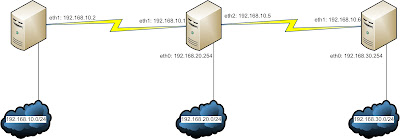
Image
Scenario This article is actually a modified version of a previous article IP Details All the Routers in the diagram are actually CentOS Machines. Router Alpha: eth0: 192.168.10.254/24 eth1: 10.0.0.2/30 Router Beta: eth0: 192.168.20.254/24 eth1: 10.0.0.1/30 eth2: 10.0.0.5/30 Router Gamma: eth0: 192.168.30.254/24 eth1: 10.0.0.6/30 Objective We would be configuring the Linux boxes with dynamic routing protocol OSPF for total connectivity. This would be done with the help of Quagga. Router Alpha Configuration root@alpha:~# yum install quagga W e would be configuring the interface parameters. Keep in mind, there are example configuration files stored in /usr/share/doc/quagga/ root@alpha:~# cd /etc/quagga root@alpha:/etc/quagga# cat zebra.conf .sample > zebra.conf root@alpha:/etc/quagga# vim zebra.conf  hostname AplhaRouter password zebra enable password zebra ! ! Interface's description....

Cacti on CentOS 6 (Setting up the System)

Step 1: Installing RPM I would recommend using the repository of repoforge.org. It has a large collection and I can get all the necessary RPMs there. [root@centu ~]# yum install freetype-devel libpng-devel libart_lgpl-devel php-gd mysql-server mysql php-mysql php-pear php-common php-gd php-devel php php-mbstring php-cli php-snmp php-pear-Net-SMTP php-mysql httpd net-snmp-utils php-snmp net-snmp-libs crontabs cacti   Step 2: Preparing SNMP It is always a best practice to backup any configuration file before editing. To get SNMP ready to roll, we need to edit the following configuration file: [root@centu snmp]# vim /etc/snmp/snmpd.conf  com2sec myUser 192.168.10.0/24 myCommunity group myGroup v1 myUser group myGroup v2c myUser view all included .1 access myGroup "" any noauth exact all all none  My Server IP is 192.168.10.13, and I have configured SNMP to match my requirements. Needless to say, your configura...