Password Protecting Grub
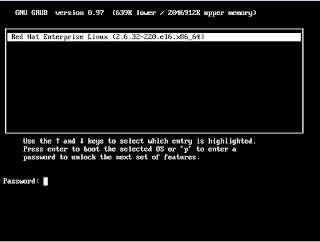
To protect grub using md5 encrypted password, we can use this simple technique- [root@zimbra ~]# grub-md5-crypt Password: Retype password: $1$zsPMx0$DkhqPFB1ouY/W7uhvCJZL1 This command generates a MD5 encrypted password that will be added to the file grub.conf . Here is my sample file- [root@zimbra ~]# vim /etc/grub.conf ##################################################################################### default=0 timeout=5 splashimage=(hd0,0)/grub/splash.xpm.gz password --md5 $1$zsPMx0$DkhqPFB1ouY/W7uhvCJZL1 hiddenmenu title Red Hat Enterprise Linux (2.6.32-220.el6.x86_64) root (hd0,0) kernel /vmlinuz-2.6.32-220.el6.x86_64 ro root=/dev/mapper/vg_zimbra-lv_root rd_NO_LUKS rd_LVM_LV=vg_zimbra/lv_root LANG=en_US.UTF-8 rd_NO_MD quiet SYSFONT=latarcyrheb-sun16 rhgb crashkernel=auto rd_LVM_LV=vg_zimbra/lv_swap KEYBOARDTYPE=pc KEYTABLE=us rd_NO_DM initrd /initramfs-2.6.32-220.el6.x86_64.img And we are ready. The system can be rebooted safely, and w...